Accessibility Trees for AI Browsing
An AI agent staring at a webpage has three things it can look at: the raw HTML, a screenshot, or the accessibility tree. Most projects pick one of the first two and quietly suffer for it. I want to argue for the third — and for a CSS-shaped selector language layered on top of it — as the right substrate for agents that browse the web.
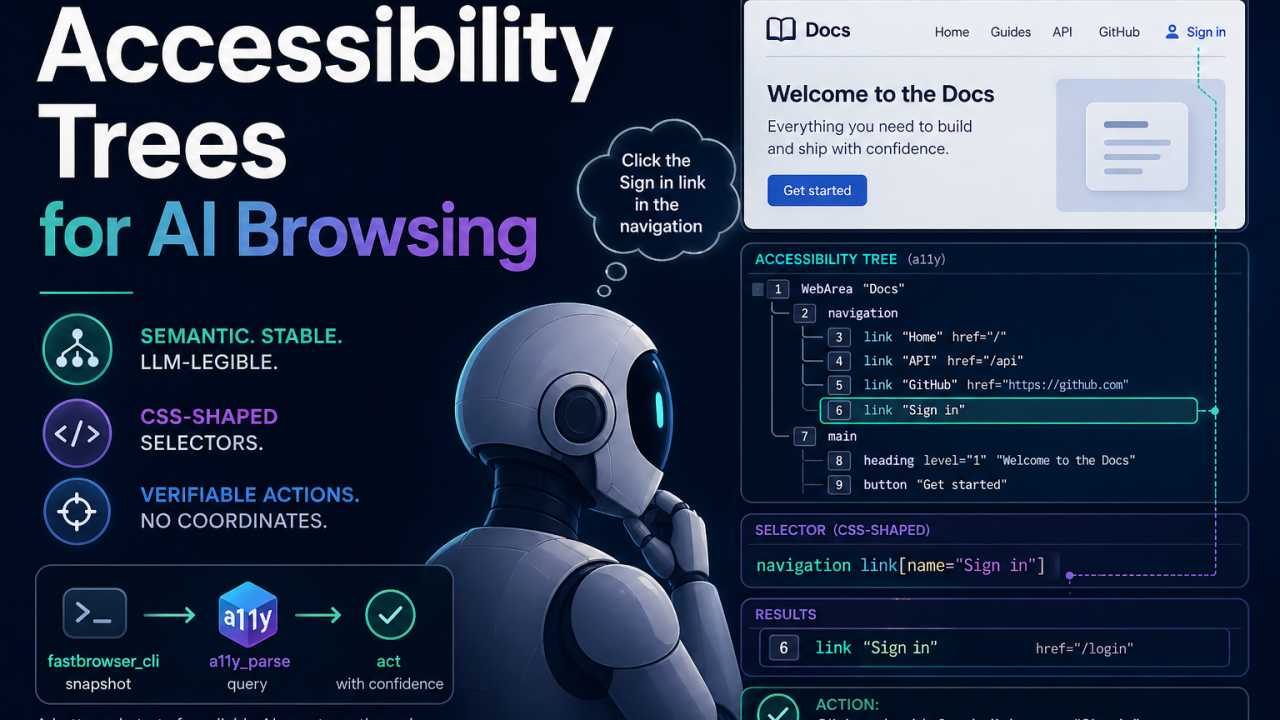
What the Accessibility Tree Actually Is
Every modern browser already builds a second, parallel representation of the page next to the DOM: the accessibility tree (a11y tree, or AX tree). It exists for screen readers and other assistive tech. Each node has a role (button, link, heading, navigation), an optional name (the human-readable label — "Submit", "Sign in", "Search products"), and a small bag of ARIA attributes (disabled, expanded, href, level).
It's hierarchical, semantic, and pre-pruned. Layout divs collapse. Decorative spans disappear. What's left is the page as something with intent.
You can poke at it without writing any code:
- Chrome DevTools ships an Accessibility pane in the Elements tab — see the Chrome DevTools accessibility reference. Inspect any element and the tree is right there.
- Playwright exposes
page.accessibility.snapshot(), which returns the tree as JSON. - Puppeteer has the same API.
Playwright also treats the a11y tree as a first-class testing surface — its accessibility testing guide shows how to scan pages for WCAG violations with @axe-core/playwright. The point isn't that we need axe; it's that mainstream test tooling already builds on this substrate, so the infrastructure is mature.
This is not new infrastructure. It's been shipping in browsers for a decade. We're just pointing it at a different consumer.
Why the DOM and Screenshots Both Fall Short
The DOM is too noisy. A typical page is thousands of nested divs with class names like css-1gx4k7c that change every deploy. Feeding raw HTML to an LLM burns tokens on layout scaffolding and forces the model to reason about structure that has nothing to do with what the page means. Worse, any selector you derive from it (div.header > nav > ul > li:nth-child(3) > a) is one CSS refactor away from breaking.
Screenshots are worse for agents. Vision models can read pages, sure, but you're paying for image tokens on every step, click coordinates break the moment a sidebar collapses or the viewport changes, and you have no audit trail. When something goes wrong, "the agent clicked at (482, 317)" tells you nothing. There's a place for vision — captchas, canvas-based UIs, charts — but it shouldn't be the default substrate.
The accessibility tree is the boring middle path that wins. It's smaller than the DOM, structured unlike a screenshot, semantically meaningful in a way both humans and LLMs find natural, and stable across visual redesigns. A button is still a button named "Submit" whether its class is btn-primary-v2 or cta-2025.
Why It Matters for AI Agents
Four properties make the a11y tree the right call:
Token economy. A serialized accessibility snapshot is typically a fraction of the corresponding HTML — often 5–10× smaller. Smaller context means cheaper calls, faster turns, and better recall on the parts of the page that actually matter.
Stable grounding. Roles and names are a contract between the page author and assistive tech. They change far less often than class names or DOM structure. Agents grounded on link[name="Sign in"] survive redesigns that shatter div.auth-block > a.btn--primary.
LLM-legible. Roles like button, link, heading and names like "Submit" or "Search" are exactly the vocabulary the model already speaks. There's no translation layer. The tree reads like a description of the page, because that's what it is.
Verifiable. Every action gets a UID. You can log "agent clicked node uid=47, role button, name Delete account" and replay or audit it later. Pixel-coordinate clicks give you nothing.
The honest caveat: the a11y tree has gaps. Custom components with bad ARIA expose junk. Heavily dynamic content can lag behind. You will occasionally drop down to the DOM or to vision. That's fine — it's a default, not a religion.
A Selector Language Over the Tree
Agents need to point at things. "Click the blue button on the right" is not a contract; it's wishful thinking. A selector is a contract.
So: agents emit selectors, the runtime resolves them against the current tree, and you get a node (or zero, or many — all of which are inspectable). This is mechanically the same loop a test framework runs, but the consumer is an LLM.
Why CSS-shaped? Two reasons, one boring, one important.
The boring one: developers already know CSS. Tooling and intuition transfer.
The important one: LLMs have seen millions of CSS selectors in training data. They are fluent in the syntax. Inventing a new query language means burning a lot of in-context examples teaching the model something it already half-knows in a worse dialect. Don't.
Prior art. Playwright's Locators — getByRole, getByLabel, getByText, getByAltText — are effectively a (non-CSS) selector API over the accessibility tree. The intuition is the same: address elements by role and accessible name, not by class soup. The contribution here is putting a CSS-shaped surface on top of that intuition, so selectors compose (descendant, child, sibling, attribute matchers, unions) the way developers already think — and the way LLMs already write.
What's different from real CSS: we select on role, name, and ARIA attributes — not tags, classes, or IDs. Same target, two ways:
DOM/CSS:        div.header > nav > ul > li:nth-child(3) > a.nav-link--external
a11y selector:  navigation link[href^="https"]
The a11y version is shorter, more meaningful, and survives the next redesign.
The full grammar lives in the spec, but you can mostly guess it. A tour:
button                              # role
*                                   # anything
#1_3                                # node by uid

link[href]                          # attribute exists
button[name="Submit"]               # exact match
link[href^="https"]                 # starts with
link[href$=".pdf"]                  # ends with
link[href*="github"]                # contains substring
button[aria-label~="primary"]       # whole-word match

navigation link                     # descendant
main > button                       # direct child
label + input                       # adjacent sibling
heading ~ button                    # any following sibling
heading, link                       # union

link:first-child                    # first child of its parent
button:last-child
menuitem:nth-child(2)
These compose. A few realistic ones:
navigation > link[href^="https"]            # external nav links only
heading[level="1"], heading[level="2"]      # top-of-page headings
main link[href*="docs"]                     # in-content doc links
form > label + input                        # input following its label
button[name~="Delete"]                      # destructive actions to flag
For an agent, this is the entire interface. It emits a string, gets back a list of nodes with UIDs, picks one, and acts. No coordinates, no class-name guessing, no DOM walks.
Honest limits: no :hover, no computed styles, no pseudo-elements, no nth-child based on visual layout. The tree doesn't carry that information, and agents don't need it. If your agent needs to know about hover states, you have a different problem.
Concrete Example
Here's the pipeline I actually use, from the a11y_parse README:
npx fastbrowser_cli take_snapshot | tail -n +2 > page.a11y.txt
npx a11y_parse --file page.a11y.txt 'navigation link[href^="https"]'
fastbrowser_cli snapshots the live page's accessibility tree as text. a11y_parse takes a CSS-shaped selector and prints matching nodes. That's the entire surface area.
In code:
import { A11yTree, A11yQuery } from 'a11y_parse';

const root = A11yTree.parse(`
uid=1 WebArea "Docs"
  uid=2 navigation
    uid=3 link "Home" href="/"
    uid=4 link "API" href="/api"
    uid=5 link "GitHub" href="https://github.com/example/repo"
  uid=6 main
    uid=7 heading "Welcome"
    uid=8 button "Get started"
`);

const externalNavLinks = A11yQuery.querySelectorAll(
        root,
        'navigation link[href^="https"]',
);
// → [ uid=5 link "GitHub" href="https://github.com/example/repo" ]
Three lines of agent-emitted selector covers a task that, in the DOM, would mean walking nested divs and hoping the class names haven't changed since last week.
Takeaways
For AI agents on the web, the substrate matters as much as the model. The accessibility tree is the cheapest, most stable, most LLM-legible substrate available right now, and it's already shipping in every browser. A CSS-shaped selector language is the lowest-friction way to let an agent act on it: developers read it without thinking, LLMs emit it without prompting, and the runtime can resolve it deterministically.
If you want to try this:
- a11y_parse — the parser and selector engine.
- fastbrowser_cli — a SKILL.md that snapshots live pages into the format
a11y_parseconsumes.
Pipe one into the other and you have an agent loop that fits in a paragraph.